The dental chart lives in a notebook or in your head
What was done to which tooth, where the past treatment is — scattered.

Features
The 41 features in our plans plus the core modules included in every plan. All of them work on the same patient record.
All featuresSpecialties
Appointments, patient record and finance are the same in every specialty. The examination screen adapts to yours.
All specialtiesClineo Lab
Turn the case sent by a clinic into a work order, follow production on a board and manage each clinic’s account in one place.
Dental lab softwareResources
Articles on regulations, switching systems and day-to-day operations.
All articlesDentistry
From appointments to the dental chart, from the lab to payments, the whole dental clinic workflow lives in Clineo. Our deepest specialty support is in dentistry.
Designed around dentistry
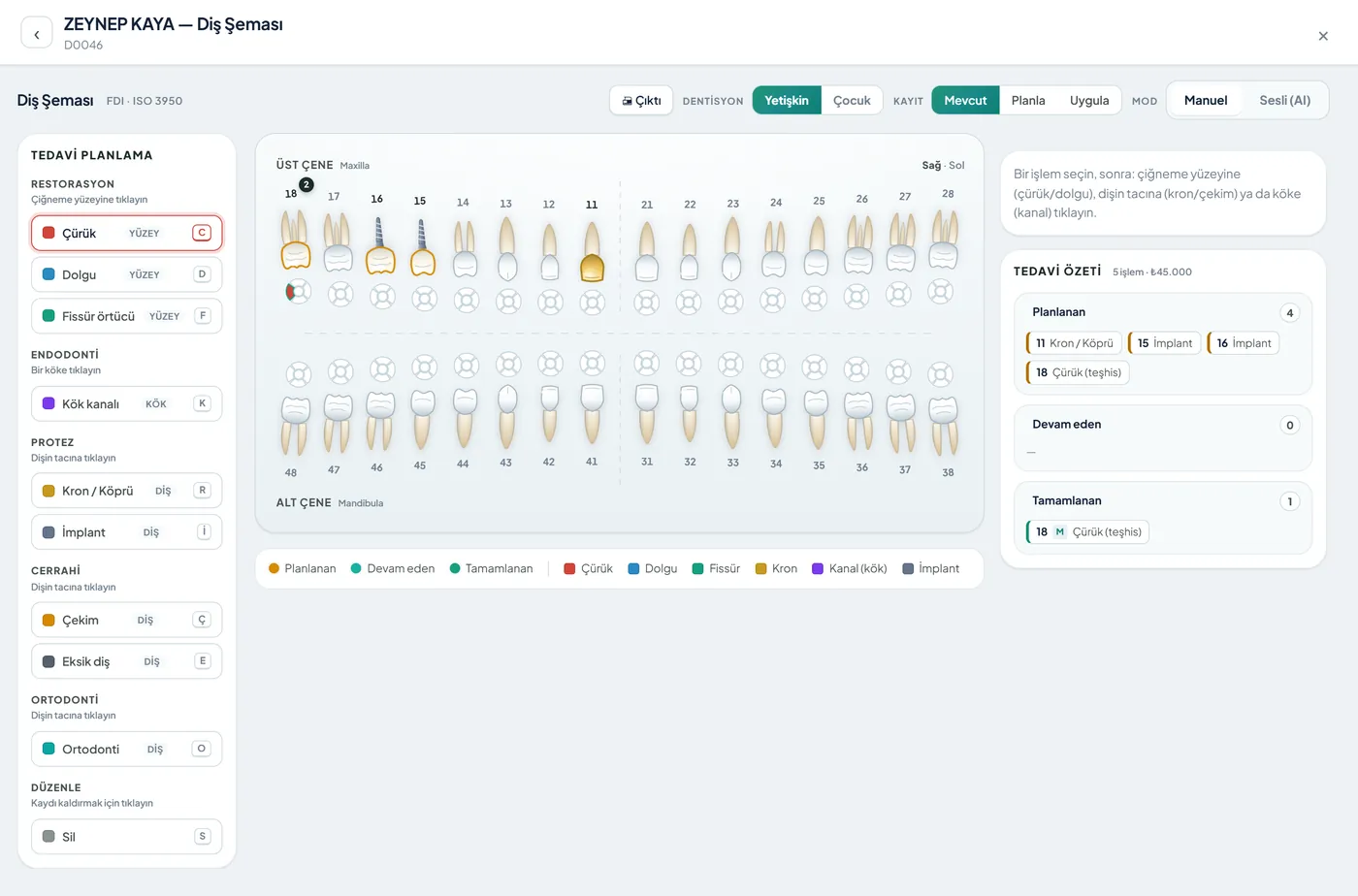
Mark the procedure on the anatomical dental chart and link it to the treatment plan and payment. Chart by voice with Neo; follow lab cases by stage.
Familiar problems
In most dental clinics the problem isn’t the dentistry; it’s scattered records. Three places come up again and again:
What was done to which tooth, where the past treatment is — scattered.
The plan is in one place, payments in another; debts slip through.
When will the bridge/prosthesis arrive, who has it — unclear.
A specialty-specific workflow
Not generic software, but modules adapted to the real workflow of a dental clinic.
Chart treatments by voice without touching the screen; Neo suggests, you confirm.
ExploreMark and plan procedures on the anatomical chart.
Step-by-step plan, cost and patient approval.
ExploreFollow external lab cases by stage and delivery date.
ExploreKeep X-rays and clinical photos on the patient record.
ExploreAutomatic commission calculation from production, with three methods.
ExploreWhat changes
You keep doing the same work; what changes is where the record lives. That’s the difference.
What was done to which tooth, where the past treatment is — scattered.
Anatomical dental chart — Click the tooth and mark the treatment; switch between adult and child. Or use your voice: “filling on 46” — Neo shows a suggestion card, and you confirm.
The plan is in one place, payments in another; debts slip through.
Treatment plan + payment on one card — Build the plan, split it into installments, send the payment link; the remaining balance is always in front of you.
When will the bridge/prosthesis arrive, who has it — unclear.
Lab case tracking — Follow work sent to an external lab; share a status link with the patient.
A specialty-specific solution
Dental chart, treatment plan, payments and the lab — all in one place, in the cloud.
Click the tooth and mark the treatment; switch between adult and child. Or use your voice: “filling on 46” — Neo shows a suggestion card, and you confirm.
Build the plan, split it into installments, send the payment link; the remaining balance is always in front of you.
Follow work sent to an external lab; share a status link with the patient.
Store and review X-ray images; print prescriptions with stamp and signature.
Modules that are enabled
When you choose dentistry as your specialty, these modules are enabled. Screens for other specialties you don’t use stay hidden.
How it works
One flow from the moment the patient walks in until payment is closed. You don’t switch screens.
Scan the ID and the name and national ID number fields fill in by themselves. The ID number is stored encrypted and shown masked on screen.
Tap the tooth on the anatomical chart and mark the procedure. The same procedure drops into the treatment plan and the amount automatically.
Say “plan a filling on tooth sixteen.” Neo shows a suggestion card; nothing is saved until you confirm.
Open the prosthesis job as a case and follow its stage. Send the payment link, and the remaining balance stays on the patient record.
Why Clineo
Dentistry is Clineo’s most mature specialty workflow.
Record treatments by voice without taking off your gloves.
The marked procedure is linked to the treatment plan and payment.
Track case stages and the delivery date.
Which doctor produced what; commissions are automatic and indisputable.
AI assistant
With your hands on the patient, you don’t need to turn to the screen. Say “plan a filling on tooth sixteen” and Neo shows a suggestion card; when you confirm, the treatment is saved. Nothing you haven’t confirmed is written. It also answers questions like “open today’s appointments” or “what does this patient still owe” and switches to the right screen by itself.
By size
The same system grows with you. As you add doctors, the calendar gains columns, and you set permissions per person.
If you work alone, the patient record, dental chart and payments are enough. No installation; your screens open the moment you choose your specialty.
The calendar works with doctor columns; each doctor sees their own appointments in their own column. Because it’s recorded which doctor produced which procedure, doctor commissions come out automatically and indisputably at month end.
You set assistant, front desk and doctor roles per module; sensitive fields open with logging. When the number of branches grows, Clineo Enterprise comes in, priced by quote.
Switching over
If today you draw the dental chart on paper and write treatment amounts in a separate ledger, you don’t have to start from scratch.
Send us your patient list as a spreadsheet and we’ll import it. Phone numbers are normalized and duplicates are removed.
No need to buy a server or install software. You sign in from a browser and can also add it to your phone like an app.
Try it with your own patients, in your own way. Decide afterwards.
Daily automatic backups are taken. For details, see the clinic management software guide and the KVKK compliance guide.
New · 24 September
Charting at surface and canal level; abutments and pontics are separate on bridges.
ExploreYou link the implant used in treatment with its lot; an implant without a lot triggers a warning.
ExploreThe captured image is matched to the patient number and lands on their record by itself.
ExplorePrescriptions from the drug catalog, printed with stamp and signature fields.
ExploreRead more
We’ve gathered the three most asked topics about choosing clinic software into separate guides.
What to look for when choosing clinic software, and what each module is for.
Practical ways to lower your no-show rate.
A clinic’s responsibilities and practical steps when processing health data.
Let’s look at it for your specialty
Let’s plan a short walkthrough for your clinic so you can see the dentistry workflow your way.