Gloves have to come off
Gloves come off to record the procedure and go back on afterwards.

Features
The 41 features in our plans plus the core modules included in every plan. All of them work on the same patient record.
All featuresSpecialties
Appointments, patient record and finance are the same in every specialty. The examination screen adapts to yours.
All specialtiesClineo Lab
Turn the case sent by a clinic into a work order, follow production on a board and manage each clinic’s account in one place.
Dental lab softwareResources
Articles on regulations, switching systems and day-to-day operations.
All articlesVoice Dental Charting
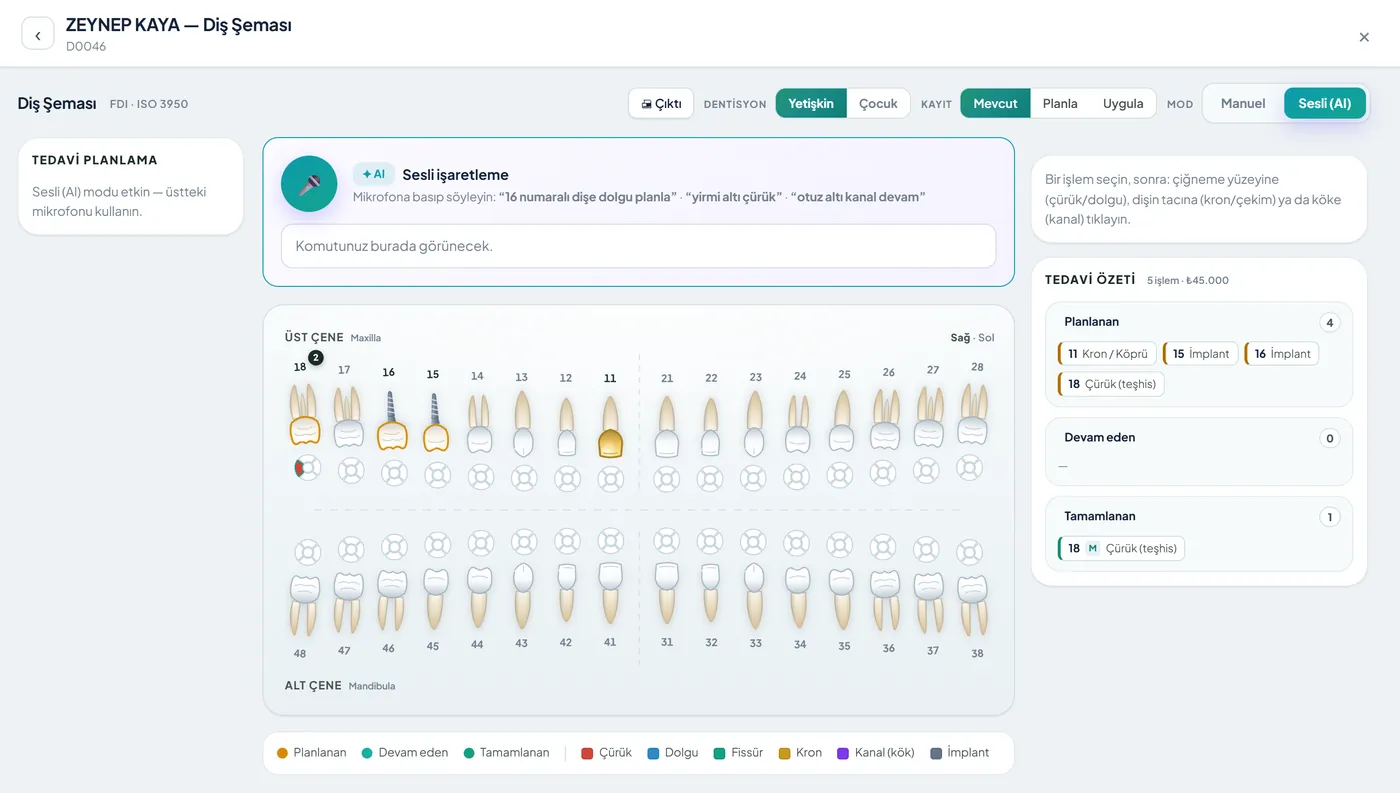
With your hands in the patient’s mouth, don’t reach for the screen. Tell Neo in Turkish — “14 numaraya dolgu” (filling on 14) — approve the suggestion, and the treatment goes onto the dental chart.
Hands full, work stalls
Give voice commands during the examination; Neo brings up a suggestion card and you approve. The procedure goes into the treatment plan and patient card — all on record.
Familiar problems
Reaching for the screen with your hands in the patient’s mouth is a problem for both hygiene and flow.
Gloves come off to record the procedure and go back on afterwards.
A procedure left for "I’ll enter it later" is remembered incompletely or wrongly at the end of the day.
You navigate menus to find the right tooth and procedure.
What changes
You mark the same treatment, without turning to the screen.
Gloves come off, the flow breaks.
Voice command — You say "14 numaraya dolgu" (filling on 14) in Turkish; Neo understands the command and brings up a suggestion card.
It’s incomplete by the end of the day.
Recorded instantly — The procedure you approve goes onto the dental chart and treatment plan right then.
Hard to follow up later.
Traceable record — Every procedure is recorded with who, what and when.
Why Clineo
Voice charting works together with Neo, the dental chart and the treatment plan.
Say “14 numaraya dolgu” in Turkish and Neo understands.
Neo suggests, you approve the procedure.
Every procedure goes to the audit log with who, what and when.
The approved procedure goes onto the dental chart and the plan.
No more taking off gloves or searching screens.
It interprets commands in clinical language.
How it works
Voice charting works together with Neo, the dental chart and the treatment plan.
Start listening during the examination.
State the tooth and treatment by voice.
Neo brings up the suggestion card.
The procedure goes onto the chart and plan.
Works together with
Voice charting sits inside the dental workflow.
the approved procedure goes into the plan
the procedure goes onto the patient card
see the full specialty-specific workflow
review the voice assistant’s limits
follow prosthetic work in the same flow
AI assistant
Neo turns what you say into a suggestion card; the card stays on screen and the treatment is recorded when you approve. No suggestion you don’t approve is written to the patient file.
Where to start
Try it first without a patient: call Neo, say "14 numaraya dolgu" and see how the suggestion card appears. Once you’ve tried the approval step, using it during an examination feels safe. Knowing that no suggestion you don’t approve is written to the patient file shortens the learning curve noticeably.
New · 24 September
A voice command creates a draft mark on the dental chart; it isn’t recorded until you approve.
Commands that specify a surface, such as “16 mezial oklüzal çürük” (16 mesial occlusal caries), are applied to the right surface.
FAQ
If your answer isn’t here, you can ask us directly in the demo call.
Ask in the demoReady when you are
Let’s plan a short walkthrough for your specialty so you can see this feature in your own clinic workflow.