Session notes are scattered; going back is hard
What was discussed last session, which homework was given — you’re leafing through a notebook.

Features
The 41 features in our plans plus the core modules included in every plan. All of them work on the same patient record.
All featuresSpecialties
Appointments, patient record and finance are the same in every specialty. The examination screen adapts to yours.
All specialtiesClineo Lab
Turn the case sent by a clinic into a work order, follow production on a board and manage each clinic’s account in one place.
Dental lab softwareResources
Articles on regulations, switching systems and day-to-day operations.
All articlesPsychology
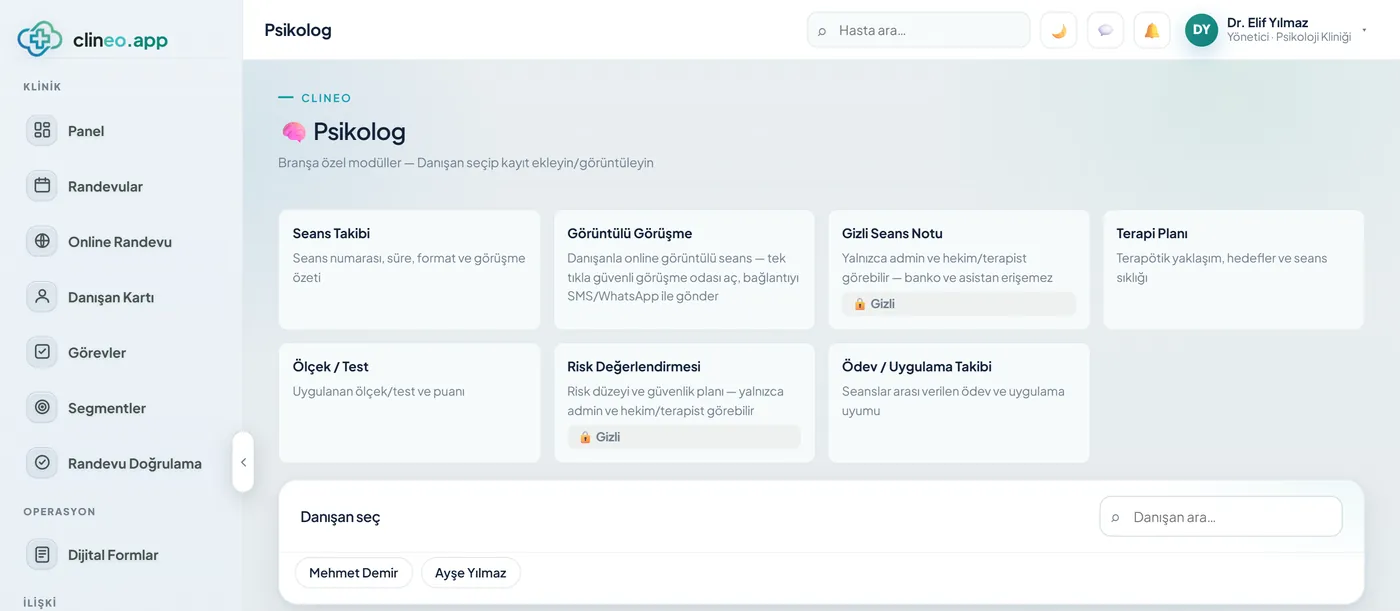
From session notes to scales, from remote sessions to appointments, the psychology workflow is in Clineo. Client privacy is the default.
Built for the subtleties of psychology
Tie session notes to a role so the rest of the team can’t see them. Score scales automatically and meet clients remotely — call content isn’t stored.
Familiar problems
In psychology you follow a process, not a file. The process breaks at three points:
What was discussed last session, which homework was given — you’re leafing through a notebook.
The front desk and assistant shouldn’t see them, but the system doesn’t separate them.
The score is in one place, the therapy goal in another; progress isn’t visible.
A specialty-specific workflow
Not generic software; modules adapted to the real workflow of a psychology practice.
Confidential notes tied to roles; closed to the front desk and other staff.
ExplorePHQ-9, GAD-7 and BAI are scored automatically and followed on a chart.
ExploreRemote sessions; call content isn’t recorded.
ExploreSession calendar and automatic reminders.
ExploreNotes, scales and history on one secure card.
ExploreLet clients book their own appointment at a time that suits them.
ExploreWhat changes
You keep doing the same work; what changes is where the record lives. That’s the difference.
What was discussed last session, which homework was given — you’re leafing through a notebook.
Session Cockpit — the session on one screen — Agenda, content, plan and private notes; mark the session mode and mental state with chips. Risk flag, fee and payment in the same place.
The front desk and assistant shouldn’t see them, but the system doesn’t separate them.
A rich clinical note system — 37 note types, ready templates including SOAP/DAP, version history. Confidential notes are role-restricted — the front desk and assistants can’t reach them; encrypted on disk.
The score is in one place, the therapy goal in another; progress isn’t visible.
Clinical scales + client link — PHQ-9, GAD-7, Beck Anxiety, PCL-5; send the link and the client fills it in at home — score and severity trend on record.
A specialty-specific solution
Sessions, notes, scales and the client’s whole flow — with privacy protected, KVKK-compliant.
Agenda, content, plan and private notes; mark the session mode and mental state with chips. Risk flag, fee and payment in the same place.
37 note types, ready templates including SOAP/DAP, version history. Confidential notes are role-restricted — the front desk and assistants can’t reach them; encrypted on disk.
PHQ-9, GAD-7, Beck Anxiety, PCL-5; send the link and the client fills it in at home — score and severity trend on record.
Sessions, notes, scales, goals and appointments on one timeline; open the file and recall the process in seconds.
Modules that are enabled
When you choose psychology as your specialty, these modules open. Unrelated screens like the dental chart never appear.
How it works
Recall before the session, recording during it, homework after it — all three on one screen.
The "Timeline" tab shows sessions, notes, scales, goals and appointments on one timeline. You recall the last session in seconds.
Agenda, content and plan on one screen. Mark the session mode and mental state with chips; the risk flag, fee and payment are in the same place too.
The confidential note is role-restricted. The front desk and assistants can’t reach it, it stays encrypted on disk, and openings are logged.
Send the client a PHQ-9, GAD-7, Beck Anxiety or PCL-5 link. The client fills it in at home; the score and severity trend go into the file.
Why Clineo
In psychology the most sensitive data is the session note; Clineo takes that seriously.
Session content is tied to a role; it stays closed to the team.
PHQ-9/GAD-7 are scored automatically; see the change on a chart.
Video calls run on our own infrastructure; content isn’t stored.
Notes, scales and appointments on the same secure card.
AI assistant
Before a session, when you ask "what was this client’s last scale score", Neo reads it from the file and tells you. It opens the client card, the session cockpit or the scale screen by voice. Neo doesn’t write clinical notes or make decisions; it summarises the data it reads and takes you to the right screen.
By size
The same system grows with you. As you add doctors, the calendar gains columns, and you set permissions per person.
If you work with your own clients, the session cockpit, notes and scales are enough. The confidential note is already open only to you.
Each therapist sees their own clients and agenda. Confidential session notes are role-restricted; the front desk and assistants can’t reach any therapist’s notes.
You can override roles and permissions per person; you decide who has read, write or full control in which module. Internal messaging and team routing stay in the same panel.
Switching over
If today you write session notes in your diary and scale scores in a separate file, you don’t have to start from scratch.
Send us your patient list as a spreadsheet and we’ll import it. Phone numbers are normalized and duplicates are removed.
No need to buy a server or install software. You sign in from a browser and can also add it to your phone like an app.
Try it with your own patients, in your own way. Decide afterwards.
Daily automatic backups are taken. For details, see the clinic management software guide and the KVKK compliance guide.
Session management
Sessions, clinical notes, goals, scales and homework in the same client record.
FAQ
If your answer isn’t here, you can ask us directly in the demo call.
Ask in the demoRead more
We’ve gathered the three most asked topics about choosing clinic software into separate guides.
What to look for when choosing clinic software, and what each module is for.
Practical ways to lower your no-show rate.
A clinic’s responsibilities and practical steps when processing health data.
Let’s look at it for your specialty
Let’s plan a short demo for your practice; see the psychology flow in your own setup.