Examination notes and vitals are scattered
Blood pressure, pulse, temperature — where did you write them?

Features
The 41 features in our plans plus the core modules included in every plan. All of them work on the same patient record.
All featuresSpecialties
Appointments, patient record and finance are the same in every specialty. The examination screen adapts to yours.
All specialtiesClineo Lab
Turn the case sent by a clinic into a work order, follow production on a board and manage each clinic’s account in one place.
Dental lab softwareResources
Articles on regulations, switching systems and day-to-day operations.
All articlesGeneral Practice
Whatever your specialty, bring a flexible patient record, appointments, forms and finance together in one place in Clineo.
Regardless of specialty
Whatever your specialty, bring a flexible patient record, appointments, forms and finance together in one place in Clineo.
Familiar problems
Practice management doesn’t have to be complicated. Three things break the order:
Blood pressure, pulse, temperature — where did you write them?
You ordered it — did the result come back? No tracking.
When was the patient supposed to come? No one reminds.
A specialty-specific workflow
Not generic software, but modules adapted to the real workflow of a general practice.
Calendar, reminders and online booking in one flow.
ExploreExamination, images and documents on one record.
ExploreFill in medical history and consent forms digitally.
ExplorePayments, expenses and cash flow in one place.
ExploreClinical and financial indicators at a glance.
ExploreRemote consultations and follow-up.
ExploreWhat changes
You keep doing the same work; what changes is where the record lives. That’s the difference.
Blood pressure, pulse, temperature — where did you write them?
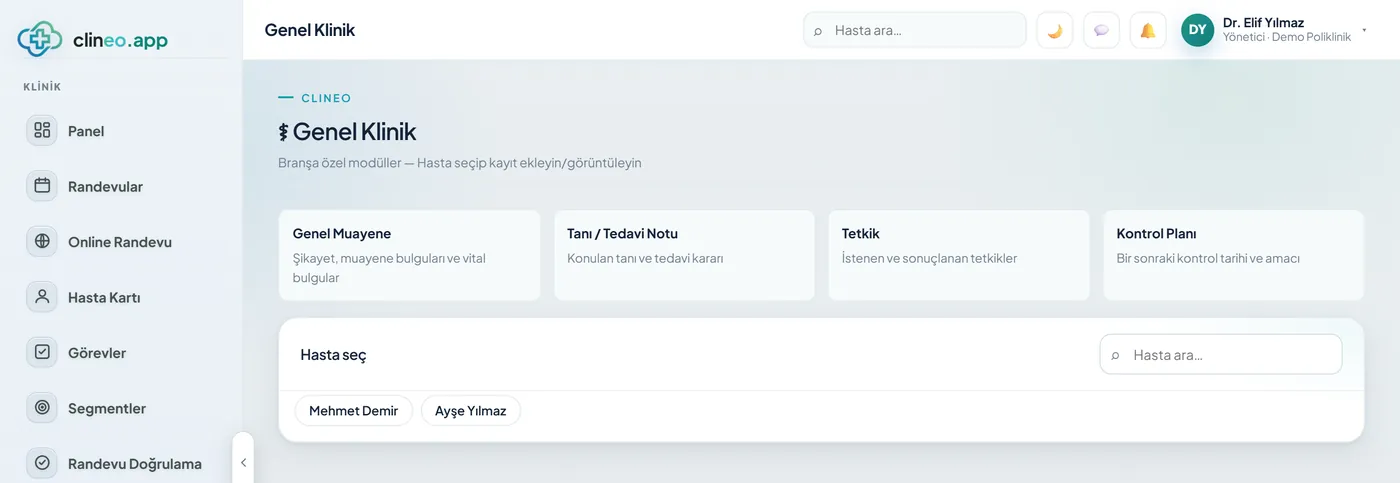
General examination + vitals — Complaint, findings, blood pressure/pulse/temperature in one form; BP badge on the record.
You ordered it — did the result come back? No tracking.
Diagnosis/treatment and test tracking — Follow the diagnosis, prescription notes, and tests ordered and resulted.
When was the patient supposed to come? No one reminds.
Follow-up plan + reminders — Set the follow-up date; SMS/WhatsApp reminds automatically.
A specialty-specific solution
Complaint, vitals, tests and follow-up — the patient journey on one screen.
Complaint, findings, blood pressure/pulse/temperature in one form; BP badge on the record.
Follow the diagnosis, prescription notes, and tests ordered and resulted.
Set the follow-up date; SMS/WhatsApp reminds automatically.
Modules that are enabled
When you choose general practice as your specialty, these modules are enabled. As much as a practice needs, not more.
How it works
One screen from complaint to follow-up. Practice management in its entirety comes down to these four steps.
Complaint, findings, blood pressure, pulse and temperature in the same form. The blood pressure badge appears on the patient record.
Write the diagnosis and treatment note, and print the prescription with stamp and signature.
Mark the ordered test and close it when the result arrives. Open tests stay on the list.
Set the follow-up date, and let the SMS, email or WhatsApp reminder go out automatically.
Why Clineo
The flexible structure adapts to every type of clinic.
Patients, appointments and finance don’t scatter.
Adaptable to the type of clinic.
In the cloud, with minimal setup and training.
Payments and expenses on the same dashboard.
AI assistant
It works with sentences like “open today’s appointments” or “what was this patient’s last blood pressure.” Neo goes to nearly thirty screens by voice and answers by reading from clinic data. If you run your practice alone, the time spent searching for screens drops noticeably.
Obligations
Before choosing a program, knowing which obligation is handled by which system makes your job easier. Let’s spell it out.
Private practices in Turkey are required to report patient data to the Ministry of Health’s MBYS system. Clineo does not currently send data to MBYS; you file the report from the Ministry’s own screen. For details, see the What is MBYS guide.
For doctors, e-SMM, not e-Fatura, is mandatory. Clineo has E-Invoice Integration but no e-SMM; you issue the receipt through your accountant’s system. For details, see the e-SMM guide.
Health data is a special category of personal data. Clineo has role-based permissions, activity logs and daily automatic backups. For details, see the KVKK compliance guide.
Ask which program handles MBYS and e-SMM before you buy. Clineo doesn’t handle these two; it handles your clinic’s own organization — patient record, appointments, forms and payments.
Scale and budget
At private practice scale, most doctors’ needs are covered by Clineo Soft. Let’s spell out what’s where.
Calendar management, treatment planning, patient files and media, mobile use, custom consent forms, appointment reminders, basic reporting, e-invoice integration, daily backups and free support are in this plan. A single-doctor practice’s daily work runs on these.
If you want patients to book their own appointments, cash and expense tracking or remote consultations, you need Clineo Smart (₺1,800/month). These three aren’t available in Soft.
It runs in the cloud; there are no server, license or installation costs. You sign in from a browser and add it to your phone like an app.
The monthly figure is shown; payment is taken yearly (Soft ₺14,400/year). All plans include a 14-day free trial; the prices shown do not include VAT.
By size
The same system grows with you. As you add doctors, the calendar gains columns, and you set permissions per person.
For practice management, the patient record, appointments and payments are enough. You don’t need to buy a server; you sign in from a browser.
The calendar is hourly with doctor columns; each doctor’s appointments sit in their own column. In the weekly view you drag an appointment to move it.
You set front desk, assistant and doctor roles per module; sensitive fields open with logging. When the number of branches grows, Clineo Enterprise comes in.
Switching over
If today you keep patient records in Excel and appointments in a separate notebook, you don’t have to start from scratch.
Send us your patient list as a spreadsheet and we’ll import it. Phone numbers are normalized and duplicates are removed.
No need to buy a server or install software. You sign in from a browser and can also add it to your phone like an app.
Try it with your own patients, in your own way. Decide afterwards.
Daily automatic backups are taken. For details, see the clinic management software guide and the KVKK compliance guide.
FAQ
If your answer isn’t here, you can ask us directly in the demo call.
Ask in the demoRead more
We’ve gathered the three most asked topics about choosing clinic software into separate guides.
What to look for when choosing clinic software, and what each module is for.
Practical ways to lower your no-show rate.
A clinic’s responsibilities and practical steps when processing health data.
Let’s look at your practice
Let’s plan a short walkthrough for your practice so you can see it with your own patient flow.