A long trip for a short consultation
For a ten-minute check-up, the patient sets aside half a day; that’s why many check-ups don’t happen.

Features
The 41 features in our plans plus the core modules included in every plan. All of them work on the same patient record.
All featuresSpecialties
Appointments, patient record and finance are the same in every specialty. The examination screen adapts to yours.
All specialtiesClineo Lab
Turn the case sent by a clinic into a work order, follow production on a board and manage each clinic’s account in one place.
Dental lab softwareResources
Articles on regulations, switching systems and day-to-day operations.
All articlesVideo Consultation
Turn an appointment into a video consultation. The patient taps a single link and joins from the browser; no app to install, no sign-up. The call stays on our own secure infrastructure from start to finish.
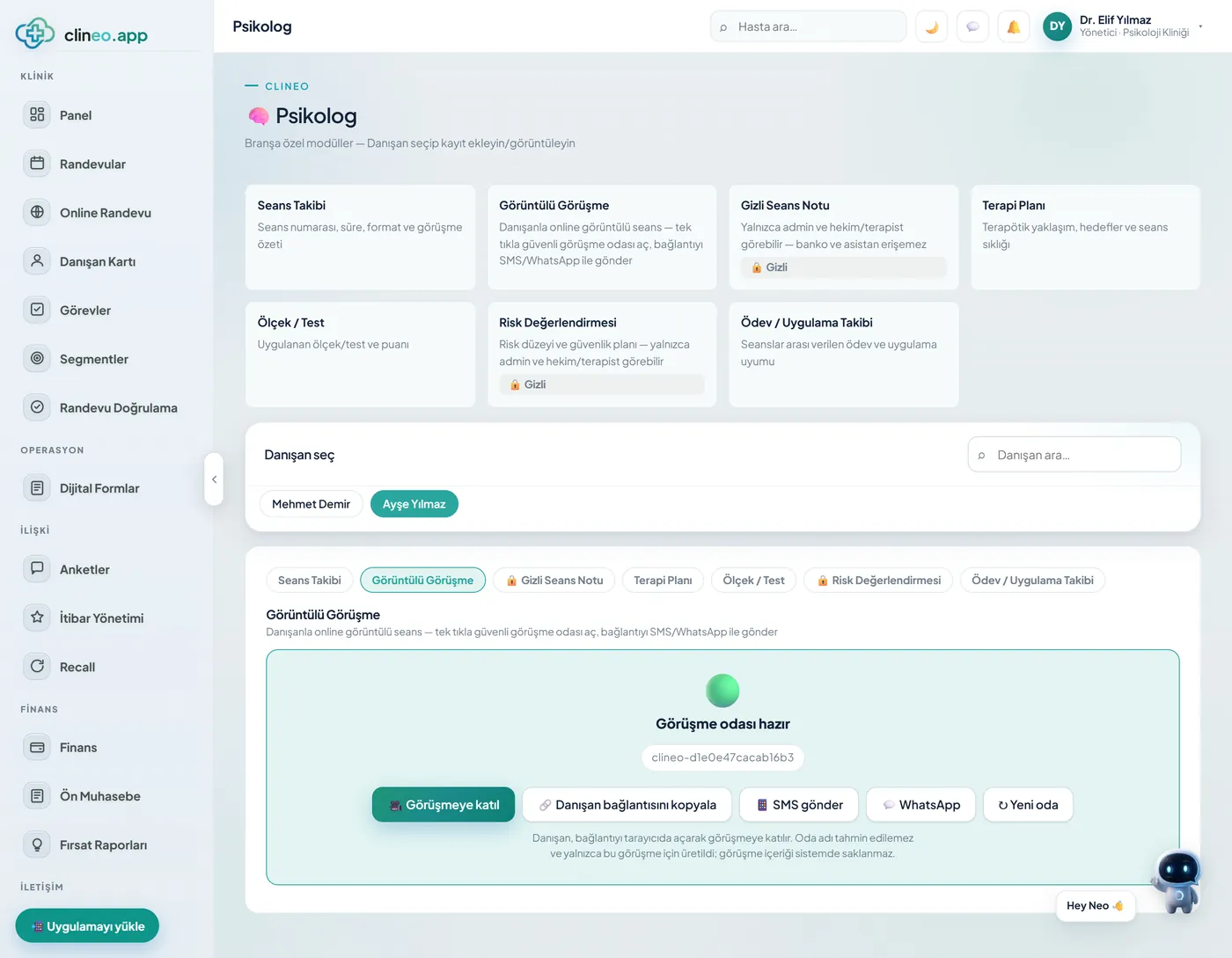
One link, zero setup
Send the call link by SMS, WhatsApp or email. When the patient taps the link, the call opens in the browser — no download, sign-up or password. You enter the room with one click from the clinic dashboard.
Familiar problems
For check-ups, sharing results and initial consultations, making the patient travel is often unnecessary.
For a ten-minute check-up, the patient sets aside half a day; that’s why many check-ups don’t happen.
Patients asked to download software for a video call often give up.
Notes from a call made on a general-purpose app don’t make it into the patient record.
What changes
You hold the same consultation; the patient doesn’t have to travel.
Short check-ups don’t happen.
Turn the appointment into video — You mark the appointment as “video”; the system prepares a secure call room.
The patient gets stuck at the barrier.
One link, zero setup — The patient taps the link, and it opens in the browser. No download, sign-up or password.
Notes are written somewhere else.
Start from the dashboard, write to the record — You enter the room from the dashboard and write the note straight onto the patient record.
Why Clineo video consultation
Video consultation isn’t a separate app; it lives inside the same system as your appointments, patient records and notes.
The patient taps the link and the call starts in the browser. Phone, tablet or computer — it works the same way on all of them.
Audio and video aren’t recorded or kept on our servers. When the call ends, only the clinical note you entered remains.
It doesn’t depend on an external calling service. The connection runs end to end through our own system; data doesn’t go to another company.
The call starts from within the relevant appointment. Who talked to which patient, and when, is clear in the calendar.
Every call link is signed and time-limited. When the call closes, the link becomes invalid and won’t open even if shared.
From psychologists to dietitians, from dermatology to follow-up exams — move every consultation that doesn’t need to be face to face onto the screen.
How it works
No need to call the patient or set up a separate connection. The flow is already part of the clinic’s daily routine.
Mark the appointment as “video”; the system prepares a secure call room.
The patient receives the call link by SMS/WhatsApp/email.
They tap the link, allow access in the browser and enter the room. No installation.
Start the call from the dashboard; write your note straight onto the patient record.
Works together with
A video consultation sits in the flow just like a regular appointment.
video appointments appear in the calendar too
patients create their own remote consultation request
the call note is recorded on the patient record
send the call link with the reminder
review connection and access rules
AI assistant
Say “open today’s video appointments” and Neo brings up the list. The decision to start the call stays with you.
Where to start
There’s no separate setup to get started. Mark a suitable check-up appointment as “video,” send the link to the patient and enter the room from the dashboard. Holding the first call with a patient you know is the easiest way to see the flow. Since patients aren’t asked to download or sign up, most clinics get through the first try without problems.
FAQ
If your answer isn’t here, you can ask us directly in the demo call.
Ask in the demoBe there, even remotely
Let’s plan a short walkthrough for your specialty so you can see the call flow within your own appointment routine.