The remaining quantity is unknown
Only one person knows what’s left in the cupboard. When that person is on leave, nobody knows.

Features
The 41 features in our plans plus the core modules included in every plan. All of them work on the same patient record.
All featuresSpecialties
Appointments, patient record and finance are the same in every specialty. The examination screen adapts to yours.
All specialtiesClineo Lab
Turn the case sent by a clinic into a work order, follow production on a board and manage each clinic’s account in one place.
Dental lab softwareResources
Articles on regulations, switching systems and day-to-day operations.
All articlesInventory Management
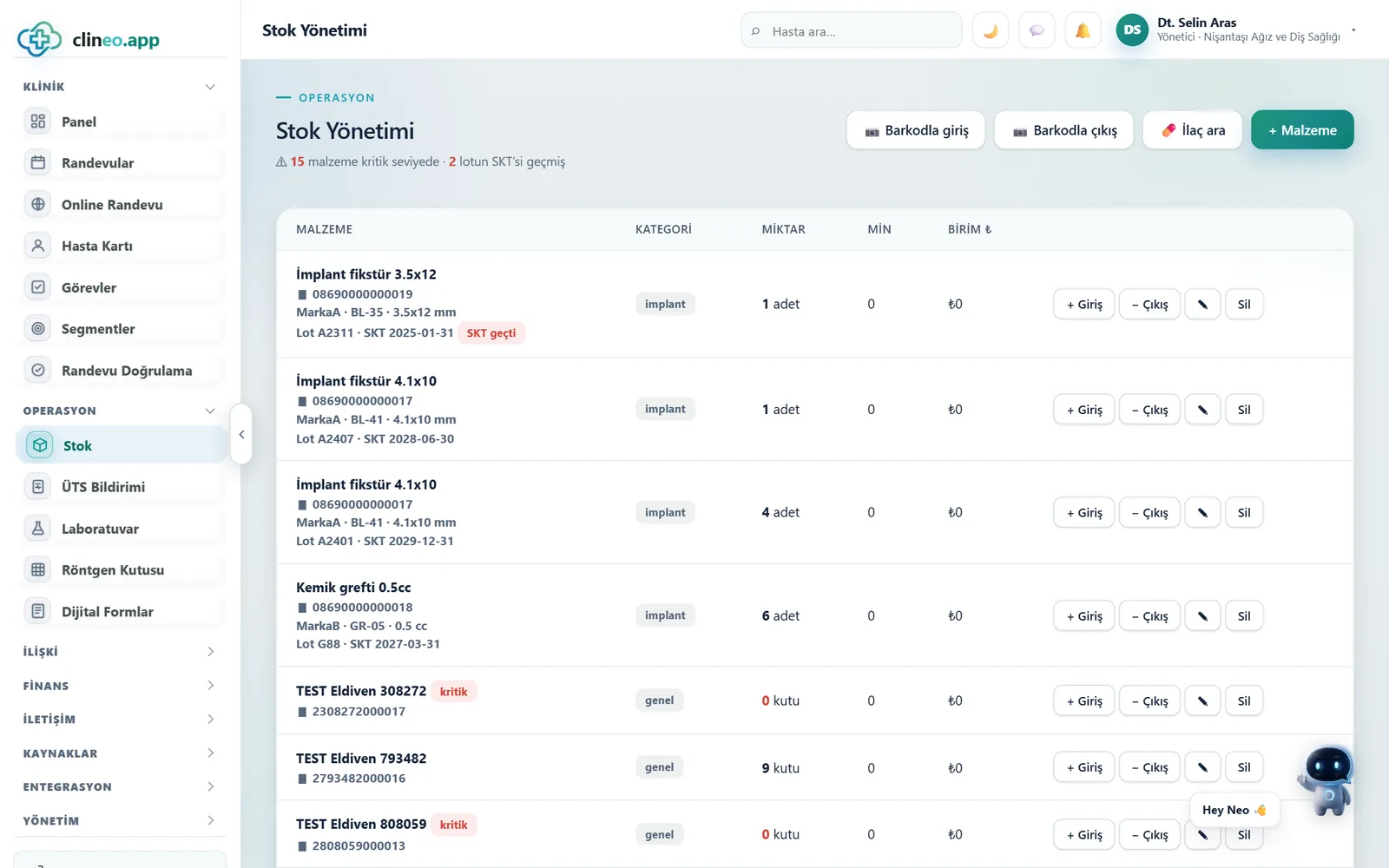
Control stock levels, movements and critical products. Record quickly by barcode and notice running-out supplies in time.
You don’t like surprises
Record supplies in and out and set a critical level. Get a warning when stock drops; don’t run out of supplies in front of a patient.
Familiar problems
In most clinics stock isn’t counted, it’s noticed. And the moment it’s noticed is usually too late.
Only one person knows what’s left in the cupboard. When that person is on leave, nobody knows.
When supplies run out during a procedure, the appointment is postponed.
An expired product can’t be used; the purchased supplies go in the bin.
What changes
You know what you have without counting.
Whoever opens the cupboard sees it; whoever doesn’t, doesn’t know.
Quantity stays on record — Supplies in and out are recorded. The remaining quantity is in one place everyone can see.
Orders are always placed at the last minute.
Critical level warning — Products falling below the threshold you set move up the list. You have time to order.
Unusable supplies are written off as a loss.
Date tracking — The expiry date is recorded; you see products nearing it in advance.
Why Clineo
Stock works together with purchasing, expenses and the drug catalogue.
Record every supply movement and see what’s left.
Get notified when stock drops below the threshold you set.
Identify the product by barcode and record it quickly.
Follow how fast each supply is used up.
Track stock value and expenses.
Don’t miss expiry dates.
How it works
Stock works together with purchasing, expenses and the drug catalogue.
Add the supply and its critical level.
Record purchased supplies by barcode.
Deduct what’s used from stock.
Restock when it runs low.
Works together with
Stock sits in the background of the clinic’s workings but is tied to finance and supply.
supply cost is reflected in finance
plan regular supply expenses
run medical device notifications alongside
anticipate supply needs for planned procedures
follow consumption and movements in reports
AI assistant
When you ask "what’s at critical stock", Neo lists the products running low. You don’t need to navigate menus to reach the stock screen; you ask the question and the list comes up.
New · 24 September
You scan the QR code on the box both on receipt and on use; product, lot, expiry date and serial number are parsed.
You deduct used products from stock by scanning; you don’t have to pick the lot by hand.
A barcode whose check digit doesn’t match can’t open a new product card.
If the scanned lot isn’t in stock, it isn’t deducted from another lot; you see a warning.
Even if the handheld scanner can’t send the field separator, the most consistent parsing is chosen and confirmation is requested.
FAQ
If your answer isn’t here, you can ask us directly in the demo call.
Ask in the demoReady when you are
Let’s plan a short walkthrough for your specialty so you can see this feature in your own clinic workflow.