Typing by hand takes time
Name, surname, ID number and date of birth are entered one by one; the queue of waiting patients grows.

Features
The 41 features in our plans plus the core modules included in every plan. All of them work on the same patient record.
All featuresSpecialties
Appointments, patient record and finance are the same in every specialty. The examination screen adapts to yours.
All specialtiesClineo Lab
Turn the case sent by a clinic into a work order, follow production on a board and manage each clinic’s account in one place.
Dental lab softwareResources
Articles on regulations, switching systems and day-to-day operations.
All articlesID OCR
Remove the most tiring step of patient registration: hold the back of the ID card up to the camera, and Clineo fills in name, surname, ID number and date of birth in seconds. You just check them.
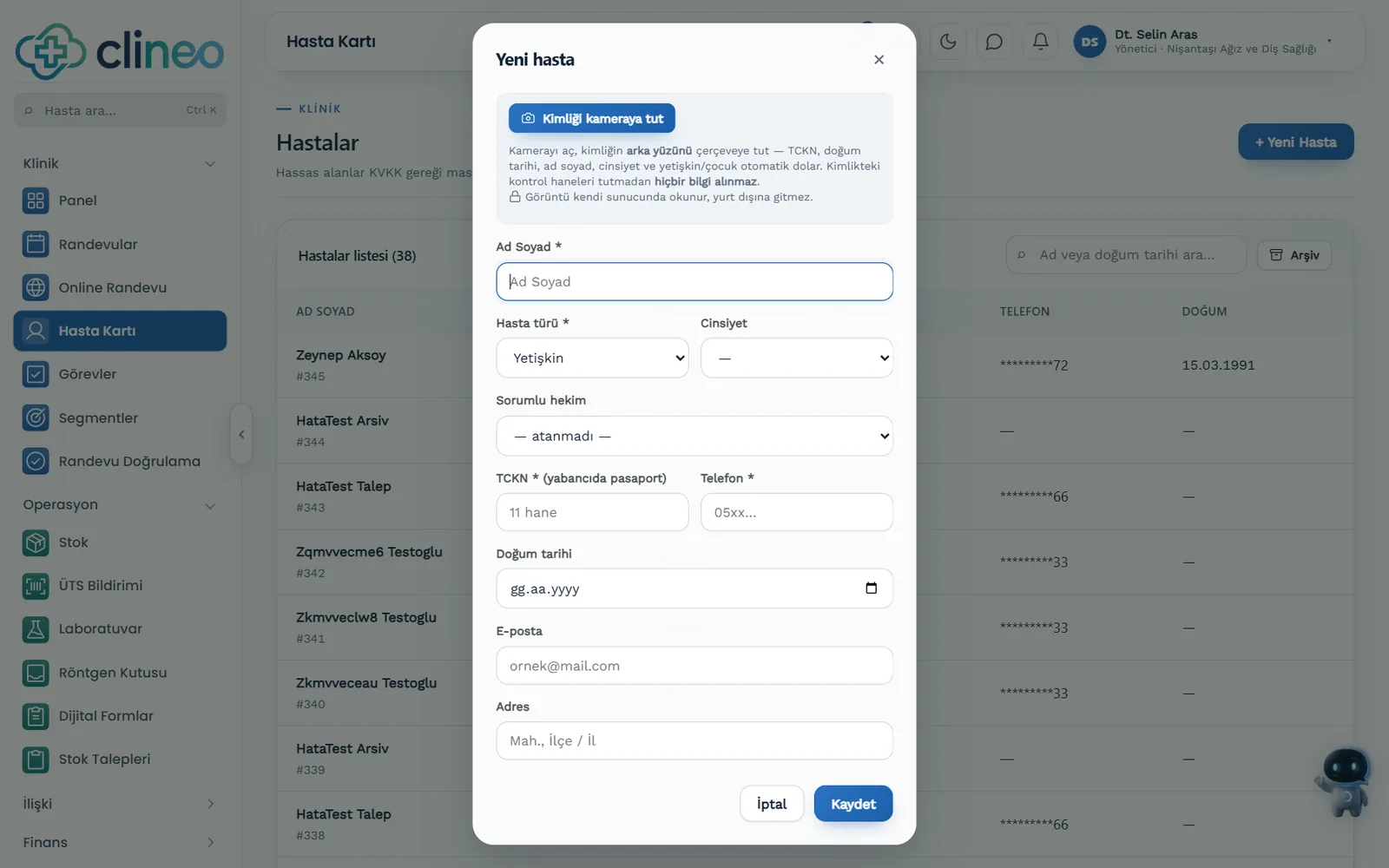
No more manual entry
The live camera reads the ID and fills in the fields itself. Multi-frame reading weeds out wrong digits; the final confirmation stays with you.
Familiar problems
The most tiring part of registering a new patient isn’t the exam; it’s typing ID details by hand at the front desk.
Name, surname, ID number and date of birth are entered one by one; the queue of waiting patients grows.
A single wrong digit causes problems later on invoices and documents.
ID photos stay on staff phones.
What changes
You record the same information — with the camera, not the keyboard.
Registration drags on; the queue builds up.
Live camera reading — Hold the back of the ID card up to the camera; name, surname, ID number and date of birth fill in within seconds.
A wrong digit makes it into the record.
Multi-frame verification — Several frames are compared and misreads are weeded out. The final confirmation stays with you.
Sensitive data travels uncontrolled.
Processed on the Clineo server — Reading happens on Clineo's own server; the image and ID number aren't sent to an outside service.
Why Clineo
ID OCR works together with the patient record and registration flow.
Hold the back of the ID card up to the camera; the fields fill in automatically.
ID fields fall into place in seconds.
Compares several frames and weeds out misreads.
ID data is processed on the Clineo server and isn't sent to an outside service.
Works with phone, tablet and desktop cameras.
Registration time and typos drop sharply.
How it works
ID OCR works together with the patient record and registration flow.
Start ID reading on the new patient screen.
Hold the back side up to the camera.
Name, surname, ID number and date of birth come in automatically.
Check it and complete the record.
Works together with
ID reading is the first step of patient registration; after that, the normal flow continues.
the information read opens the patient record directly
link it to an appointment once the record opens
have the medical history filled in after registration
have consent signed in the same session
see the sensitive data access rules
AI assistant
Once the record is created, say "Ayşe Yılmaz'ın kartını aç" and Neo goes straight to the file. No need to type in the search box.
Where to start
Open the new patient screen on a device with a camera, start ID reading and try it with your own ID. Once you’ve seen how the fields fill in, it’s easy to explain to the front desk. Scanning in good light improves accuracy; since the final confirmation always stays with the user, a misread doesn’t make it into the record.
New · 24 September
ID reading has been renewed: faster, and no more filling in the wrong field.
A frame whose check digits in the lines on the back of the ID, or whose national ID number algorithm, doesn’t match is never accepted.
Name and gender, which have no check digit, aren’t locked in until they read the same in two separate frames.
When several readings happen at once, they don’t hold each other up; the result arrives quickly.
FAQ
Can’t find your answer? Open the demo and try it yourself. If you get stuck, the user guide is at hand.
Open the demoReady when you are
Open the demo and try Clineo in your own clinic flow. Your account opens right away, free for 14 days.