Regional examination is scattered
Knee or shoulder, which finding — in bits and pieces.

Features
The 41 features in our plans plus the core modules included in every plan. All of them work on the same patient record.
All featuresSpecialties
Appointments, patient record and finance are the same in every specialty. The examination screen adapts to yours.
All specialtiesClineo Lab
Turn the case sent by a clinic into a work order, follow production on a board and manage each clinic’s account in one place.
Dental lab softwareResources
Articles on regulations, switching systems and day-to-day operations.
All articlesOrthopedics
Gather imaging, the treatment course and follow-up appointments on the patient card.
Built for orthopaedics
Gather imaging, the treatment course and follow-up appointments on the patient card.
Familiar problems
In orthopaedics the process spreads over weeks. As it spreads, three things go undocumented:
Knee or shoulder, which finding — in bits and pieces.
X-ray/MRI findings — the history isn’t at hand.
Is the fracture healing? You can’t show it with figures.
A specialty-specific workflow
Not generic software; modules adapted to the real workflow of an orthopaedic clinic.
Calendar, reminders and online booking in one flow.
ExploreExamination, images and documents on one record.
ExploreFill in medical history and consent forms digitally.
ExplorePayments, expenses and cash flow in one place.
ExploreClinical and financial indicators at a glance.
ExploreRemote consultations and follow-up.
ExploreWhat changes
You keep doing the same work; what changes is where the record lives. That’s the difference.
Knee or shoulder, which finding — in bits and pieces.
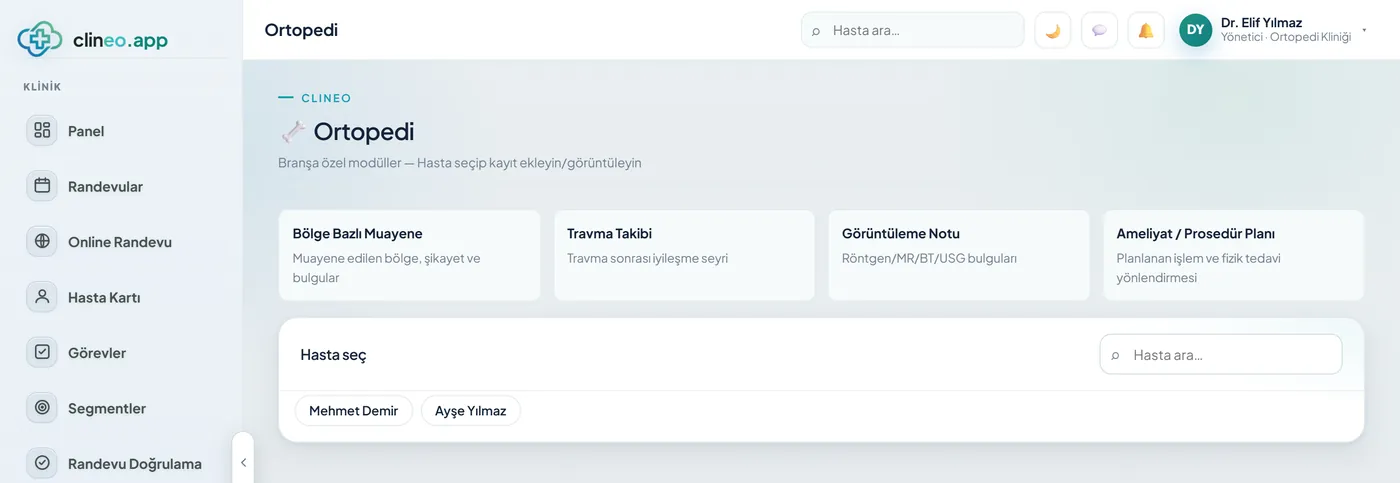
Region-based examination — Neck, lower back, shoulder, knee...; complaints and findings tied to the region.
X-ray/MRI findings — the history isn’t at hand.
Trauma tracking — Diagnosis, follow-up day and course (healing/stable/worsening).
Is the fracture healing? You can’t show it with figures.
Imaging + surgery plan — X-ray/MRI/CT findings; procedure plan and physiotherapy referral.
A specialty-specific solution
Regional examination, imaging and trauma tracking — recovery on record.
Neck, lower back, shoulder, knee...; complaints and findings tied to the region.
Diagnosis, follow-up day and course (healing/stable/worsening).
X-ray/MRI/CT findings; procedure plan and physiotherapy referral.
Modules that are enabled
When you choose orthopaedics as your specialty, these modules open. Unrelated screens stay hidden.
How it works
From trauma to recovery in the same file.
Neck, lower back, shoulder, knee — complaints and findings are recorded against the region you choose.
Write the X-ray, MRI or CT finding into the patient file; keep the images on the card.
Diagnosis, follow-up day and course (healing, stable, worsening) are recorded.
Set up the surgery or procedure plan and attach the physiotherapy referral to the file.
Why Clineo
Imaging and treatment tracking together, without scattering.
X-rays and images on the patient card.
The process is followed step by step.
A follow-up calendar without gaps.
Payments and expenses on the same dashboard.
AI assistant
When you say "open this patient’s X-ray note" or "show the trauma tracking", Neo goes to the relevant screen. It reads out the history of the region.
By size
The same system grows with you. As you add doctors, the calendar gains columns, and you set permissions per person.
Regional examination, the imaging note and trauma tracking are enough.
With an agenda in doctor columns, surgery and follow-up plans don’t clash.
You attach the physiotherapy referral to the file; the team follows it from the same panel. You set roles and permissions per person.
Switching over
If today you note X-ray findings and follow-up days in a notebook, you don’t have to start from scratch.
Send us your patient list as a spreadsheet and we’ll import it. Phone numbers are normalized and duplicates are removed.
No need to buy a server or install software. You sign in from a browser and can also add it to your phone like an app.
Try it with your own patients, in your own way. Decide afterwards.
Daily automatic backups are taken. For details, see the clinic management software guide and the KVKK compliance guide.
FAQ
If your answer isn’t here, you can ask us directly in the demo call.
Ask in the demoRead more
We’ve gathered the three most asked topics about choosing clinic software into separate guides.
What to look for when choosing clinic software, and what each module is for.
Practical ways to lower your no-show rate.
A clinic’s responsibilities and practical steps when processing health data.
Let’s look at it for your specialty
Let’s plan a short demo for your clinic; see the orthopaedics flow in your own setup.