Visual acuity tracking is scattered
Did the right/left value change? You can’t compare.

Features
The 41 features in our plans plus the core modules included in every plan. All of them work on the same patient record.
All featuresSpecialties
Appointments, patient record and finance are the same in every specialty. The examination screen adapts to yours.
All specialtiesClineo Lab
Turn the case sent by a clinic into a work order, follow production on a board and manage each clinic’s account in one place.
Dental lab softwareResources
Articles on regulations, switching systems and day-to-day operations.
All articlesOphthalmology
Follow vision measurements, examination notes and follow-up appointments on one dashboard.
Built for ophthalmology
Follow vision measurements, examination notes and follow-up appointments on one dashboard.
Familiar problems
In ophthalmology, values gain meaning over the years. Without history, today’s measurement stands alone:
Did the right/left value change? You can’t compare.
Is it high, is it risky? Nothing warns you.
What was the last prescription? Hard to find.
A specialty-specific workflow
Not generic software, but modules adapted to the real workflow of an ophthalmology clinic.
Calendar, reminders and online booking in one flow.
ExploreExamination, images and documents on one record.
ExploreFill in medical history and consent forms digitally.
ExploreAutomatically call back patients due for a check-up.
ExplorePayments, expenses and cash flow in one place.
ExploreClinical and financial indicators at a glance.
ExploreWhat changes
You keep doing the same work; what changes is where the record lives. That’s the difference.
Did the right/left value change? You can’t compare.
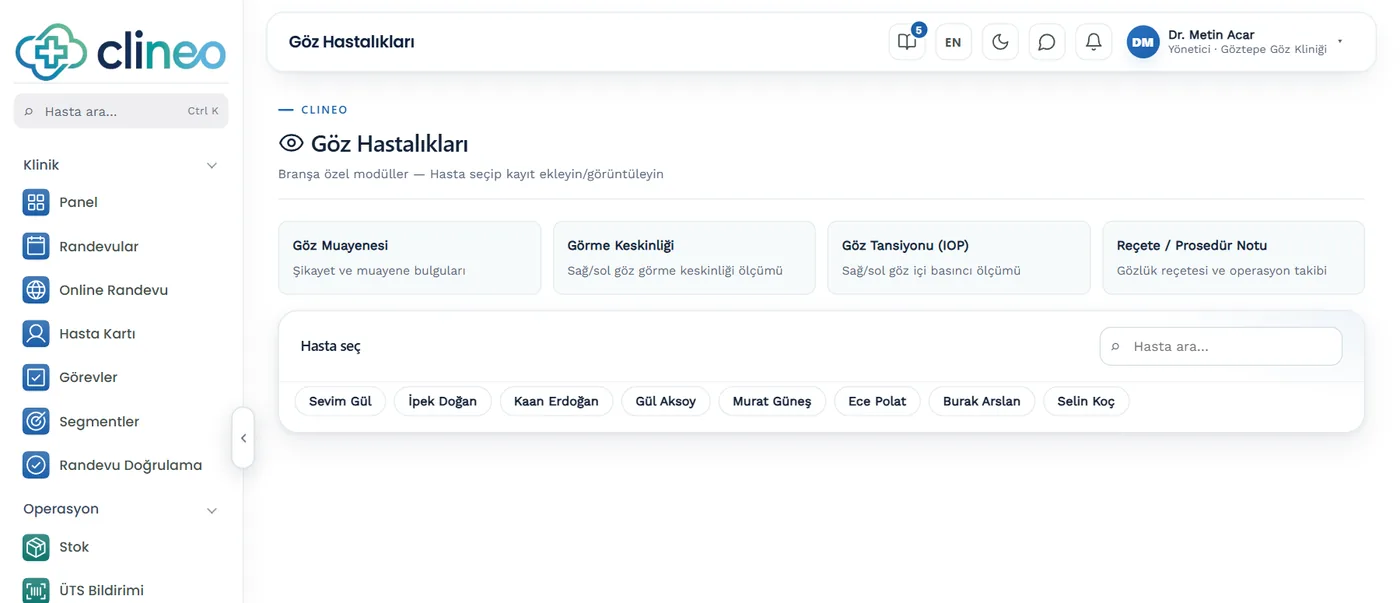
Eye examination + visual acuity — Right/left vision; recorded uncorrected, with glasses or with contact lenses.
Is it high, is it risky? Nothing warns you.
Intraocular pressure (IOP) — Right/left eye pressure; automatic high warning above 21.
What was the last prescription? Hard to find.
Prescription/procedure notes — Glasses prescriptions and operation follow-up in one file.
A specialty-specific solution
Visual acuity, IOP and prescriptions — every right/left measurement together.
Right/left vision; recorded uncorrected, with glasses or with contact lenses.
Right/left eye pressure; automatic high warning above 21.
Glasses prescriptions and operation follow-up in one file.
Modules that are enabled
When you choose ophthalmology as your specialty, these modules are enabled. Screens you don’t use stay hidden.
How it works
Vision, pressure and prescriptions — in the same file, split by right and left.
Enter uncorrected, glasses and contact lens values separately for the right and left eye.
Record right and left intraocular pressure. Above 21 mmHg, the system automatically warns that it’s high.
The glasses prescription history builds up on the patient record; you don’t search for the last prescription.
Record surgery follow-up and the check date; if you book the check, you send its reminder in one click.
Why Clineo
Follow changes in vision regularly, and don’t miss the check-up.
Compare values over time.
The history on one record.
The recall list shows patients who haven't come in.
Payments and expenses on the same dashboard.
AI assistant
Say "open this patient's specialty records" or "recent prescriptions" and Neo lists them from the record. You don't search by hand through a file spanning years.
By size
The same system grows with you. As you add doctors, the calendar gains columns, and you set permissions per person.
Examination, vision and eye pressure tracking are enough.
The doctor-column calendar warns you when exams and procedures overlap.
With role-based permissions, you set access to prescriptions and patient data separately.
Switching over
If today you write vision and eye pressure values in an examination notebook, you don’t have to start from scratch.
Send us your patient list as a spreadsheet and we’ll import it. Phone numbers are normalized and duplicates are removed.
No need to buy a server or install software. You sign in from a browser and can also add it to your phone like an app.
Try it with your own patients, in your own way. Decide afterwards.
Daily automatic backups are taken. For details, see the guide to choosing clinic software and the KVKK compliance guide.
FAQ
Can’t find your answer? Open the demo and try it yourself. If you get stuck, the user guide is at hand.
Open the demoRead more
We’ve gathered the three most asked topics about choosing clinic software into separate guides.
What to look for when choosing clinic software, and what each module is for.
Practical ways to lower your no-show rate.
A clinic’s responsibilities and practical steps when processing health data.
Let’s look at it for your specialty
Open the demo and try the ophthalmology workflow your way. Your account opens right away, free for 14 days.