Diet plans are typed one by one in Word
From scratch for every client; hours disappear.

Features
The 41 features in our plans plus the core modules included in every plan. All of them work on the same patient record.
All featuresSpecialties
Appointments, patient record and finance are the same in every specialty. The examination screen adapts to yours.
All specialtiesClineo Lab
Turn the case sent by a clinic into a work order, follow production on a board and manage each clinic’s account in one place.
Dental lab softwareResources
Articles on regulations, switching systems and day-to-day operations.
All articlesDietitian
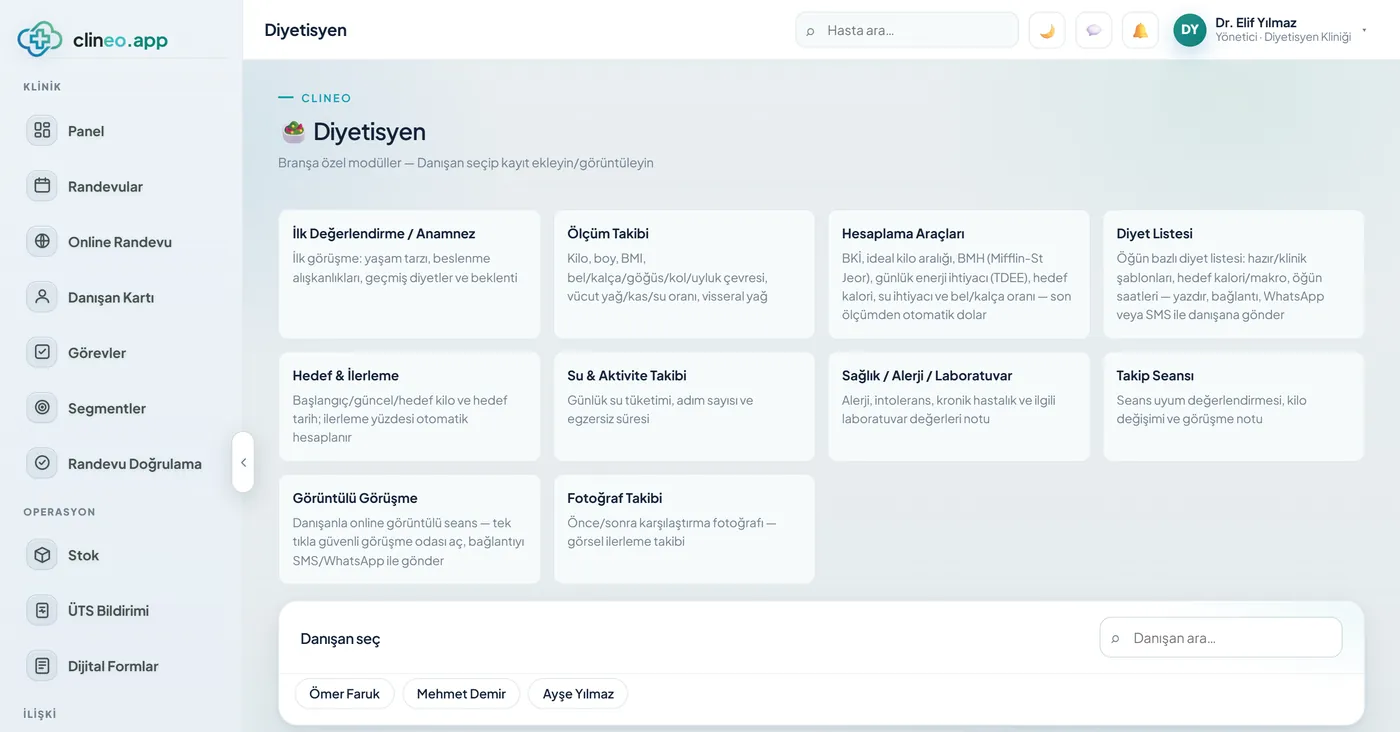
From diet plans to measurement tracking, from remote sessions to appointments, the whole client workflow lives in Clineo.
Built around the dietitian workflow
Prepare a template-based diet plan and send it to the client; track measurements and weight change; continue follow-up with video sessions.
Familiar problems
In client follow-up, the real load isn’t the session but what comes after. Three tasks come up again and again:
From scratch for every client; hours disappear.
Weight, circumferences, body fat — where did you record them?
The paper disappears and follow-through breaks down.
A specialty-specific workflow
Not generic software, but modules adapted to the real workflow of a dietitian’s practice.
Prepare template-based diet plans and share them with clients.
Track weight and measurement changes on a chart.
Remote client sessions with a single link.
ExploreReduce no-shows with automatic reminders.
ExploreLet clients book their own appointment at a time that suits them.
ExploreNutrition history, notes and measurements on one record.
ExploreWhat changes
You keep doing the same work; what changes is where the record lives. That’s the difference.
From scratch for every client; hours disappear.
Meal-based diet plans + ready templates — 1200/1500/1800 kcal and Mediterranean templates are ready; edit and send by WhatsApp/SMS.
Weight, circumferences, body fat — where did you record them?
Measurement tracking turns into a chart — Weight, waist/hip, fat/muscle/water ratio; BMI automatic, weight trend on a chart.
The paper disappears and follow-through breaks down.
Automatic calculators — BMI, ideal weight, BMR and daily energy (TDEE), water needs — filled from the latest measurement.
A specialty-specific solution
Meal plan, measurements and progress — see the client’s development clearly and share it in one click.
1200/1500/1800 kcal and Mediterranean templates are ready; edit and send by WhatsApp/SMS.
Weight, waist/hip, fat/muscle/water ratio; BMI automatic, weight trend on a chart.
BMI, ideal weight, BMR and daily energy (TDEE), water needs — filled from the latest measurement.
Start→goal progress percentage; online sessions; before/after photos.
Modules that are enabled
When you choose dietitian as your specialty, these modules are enabled. Clinic screens you won’t use stay hidden.
How it works
From measurement to plan, from plan to follow-up — all on the same record.
Enter weight, waist–hip and fat–muscle–water ratio. BMI, ideal weight, basal metabolism and daily energy needs are calculated automatically from the latest measurement.
1200, 1500, 1800 kcal and Mediterranean templates are ready. Edit the meals instead of writing from scratch.
Share the plan by WhatsApp or SMS. The client won’t lose a piece of paper; it stays on their phone.
The weight trend becomes a chart, and a progress-to-goal percentage appears. Together with before/after photos, you show the client concrete progress.
Why Clineo
Dietetics is about continuity; Clineo doesn’t let follow-up drop.
Prepare diet plans quickly from templates and share them.
Follow measurements and weight trends on a chart.
Keep follow-up uninterrupted with video sessions.
Automatic reminders reduce no-shows.
AI assistant
Ask “what’s this client’s latest weight” and let Neo tell you. It opens the measurement screen, the diet plan or the appointment calendar by voice. Calculations (BMI, BMR, daily energy) are already automatic; Neo reads them to you, and you edit the plan.
By size
The same system grows with you. As you add doctors, the calendar gains columns, and you set permissions per person.
The client record, measurements and diet plans are enough. You generate the plan from a template and send it by WhatsApp.
Each dietitian sees their own clients and calendar. Appointments are separated in the calendar’s practitioner columns.
You set roles and permissions per person. When the number of branches grows, Clineo Enterprise comes in; pricing is set by quote based on branches and users.
Switching over
If today you type diet plans one by one in Word and send them on WhatsApp, you don’t have to start from scratch.
Send us your patient list as a spreadsheet and we’ll import it. Phone numbers are normalized and duplicates are removed.
No need to buy a server or install software. You sign in from a browser and can also add it to your phone like an app.
Try it with your own patients, in your own way. Decide afterwards.
Daily automatic backups are taken. For details, see the clinic management software guide and the KVKK compliance guide.
Read more
We’ve gathered the three most asked topics about choosing clinic software into separate guides.
What to look for when choosing clinic software, and what each module is for.
Practical ways to lower your no-show rate.
A clinic’s responsibilities and practical steps when processing health data.
Let’s look at it for your specialty
Let’s plan a short walkthrough for your practice so you can see the dietitian workflow your way.