Medication/dose/adherence tracking is scattered
Is the patient taking the medication regularly, are there side effects — lost.

Features
The 41 features in our plans plus the core modules included in every plan. All of them work on the same patient record.
All featuresSpecialties
Appointments, patient record and finance are the same in every specialty. The examination screen adapts to yours.
All specialtiesClineo Lab
Turn the case sent by a clinic into a work order, follow production on a board and manage each clinic’s account in one place.
Dental lab softwareResources
Articles on regulations, switching systems and day-to-day operations.
All articlesPsychiatry
Keep consultation notes, clinical scales and medication tracking securely in one panel.
Built for psychiatry
Keep consultation notes, clinical scales and medication tracking securely in one panel.
Familiar problems
In psychiatry, medication, scales and privacy go together. If the three are in separate places, follow-up breaks:
Is the patient taking the medication regularly, are there side effects — lost.
Did the Beck/Hamilton score drop? No comparison.
The clinical note isn’t protected from the front desk or assistant.
A specialty-specific workflow
Not generic software; modules adapted to the real workflow of a psychiatry clinic.
Scales are scored automatically on the server.
ExploreSensitive notes only in authorised hands.
ExploreRemote consultations and follow-up.
ExploreCalendar, reminders and online booking in one flow.
ExploreExamination, images and documents on one record.
ExplorePayments, expenses and cash flow in one place.
ExploreWhat changes
You keep doing the same work; what changes is where the record lives. That’s the difference.
Is the patient taking the medication regularly, are there side effects — lost.
Session/examination note + medication tracking — Mental status examination; medication, dose, adherence and side effects.
Did the Beck/Hamilton score drop? No comparison.
Scales — PHQ-9, HAM-D, YMRS, CGI; scores and assessments recorded.
The clinical note isn’t protected from the front desk or assistant.
Confidential clinical note — role-restricted — The front desk and assistants can’t see it; the private note on the examination screen is visible only to the physician who wrote it.
A specialty-specific solution
Examination, medication, scales and confidential notes — with privacy protected.
Mental status examination; medication, dose, adherence and side effects.
PHQ-9, HAM-D, YMRS, CGI; scores and assessments recorded.
The front desk and assistants can’t see it; the private note on the examination screen is visible only to the physician who wrote it.
Modules that are enabled
When you choose psychiatry as your specialty, these modules open. Unrelated specialty screens stay closed.
How it works
Examination, medication and scales on one screen; the confidential note separately protected.
Record the consultation note and mental status assessment.
Medication, dose, adherence and side effects are on record. At the next consultation you open the history.
PHQ-9, HAM-D, YMRS and CGI scores build up in the file together with their assessments.
The front desk and assistants can’t see the confidential clinical note; the private note on the examination screen is visible only to the physician who wrote it.
Why Clineo
Sensitive notes only in authorised hands; follow-up without interruption.
Sensitive records don’t leave authorised hands.
Scales are scored on the server.
Follow-up continues by video call.
Payments and expenses on the same dashboard.
AI assistant
Say "open this patient's scales" or "show this patient's notes" and Neo finds the record. Neo doesn't read the content of confidential clinical notes. Neo doesn't write notes; it only reads and directs you.
By size
The same system grows with you. As you add doctors, the calendar gains columns, and you set permissions per person.
Examination, medication tracking and scales on one screen. The confidential clinical note is closed to the front desk and assistants.
With an agenda in doctor columns, appointments don’t get mixed up. Confidential notes are protected per doctor; the secretarial role cannot reach clinical notes.
With a module-based permission matrix you set separately which screens each role sees. Openings of sensitive records are logged; you see who opened what and when.
Switching over
If today you remember medication and dose history from prescription copies, you don’t have to start from scratch.
Send us your patient list as a spreadsheet and we’ll import it. Phone numbers are normalized and duplicates are removed.
No need to buy a server or install software. You sign in from a browser and can also add it to your phone like an app.
Try it with your own patients, in your own way. Decide afterwards.
Daily automatic backups are taken. For details, see the guide to choosing clinic software and the KVKK compliance guide.
New · 2 November
Parent, teacher and child forms, a child file and risk monitoring. No ready-made child scales are included; you add the scales you have the right to use.
Add a scale you have the right to use, with its items, score bands and age range. Scoring is automatic and only your clinic sees it.
Send the same scale through separate links and see the results side by side. The child’s name does not appear on the form. A marked risk item raises a warning in the clinic notification.
For under-18s, developmental history, school details, teacher feedback, and special-education reports and plans sit in one tab. Parent and child session notes are kept apart; only the author sees the child note.
Weight and height trends share a timeline with medication starts. mg/kg divides the dose you wrote by the latest weight and does not suggest a dose. Missing measurements for a child on ADHD medication go to the follow-up list.
The clinician enters the risk level and next review date; the system does not calculate a level. Due and high-risk records appear on the follow-up list.
Switch from a medication review to a therapy session for the same patient. Session packages, couple and family files and online consent are now in psychiatry too.
Store the result of a test you gave in person. A warning appears for patients nearing 18. Prepare a medication consent for under-18s.
Only the author now sees private notes and session private notes; other clinicians and the admin cannot. Risk assessments stay shared among clinicians for patient safety.
New · 1–2 October
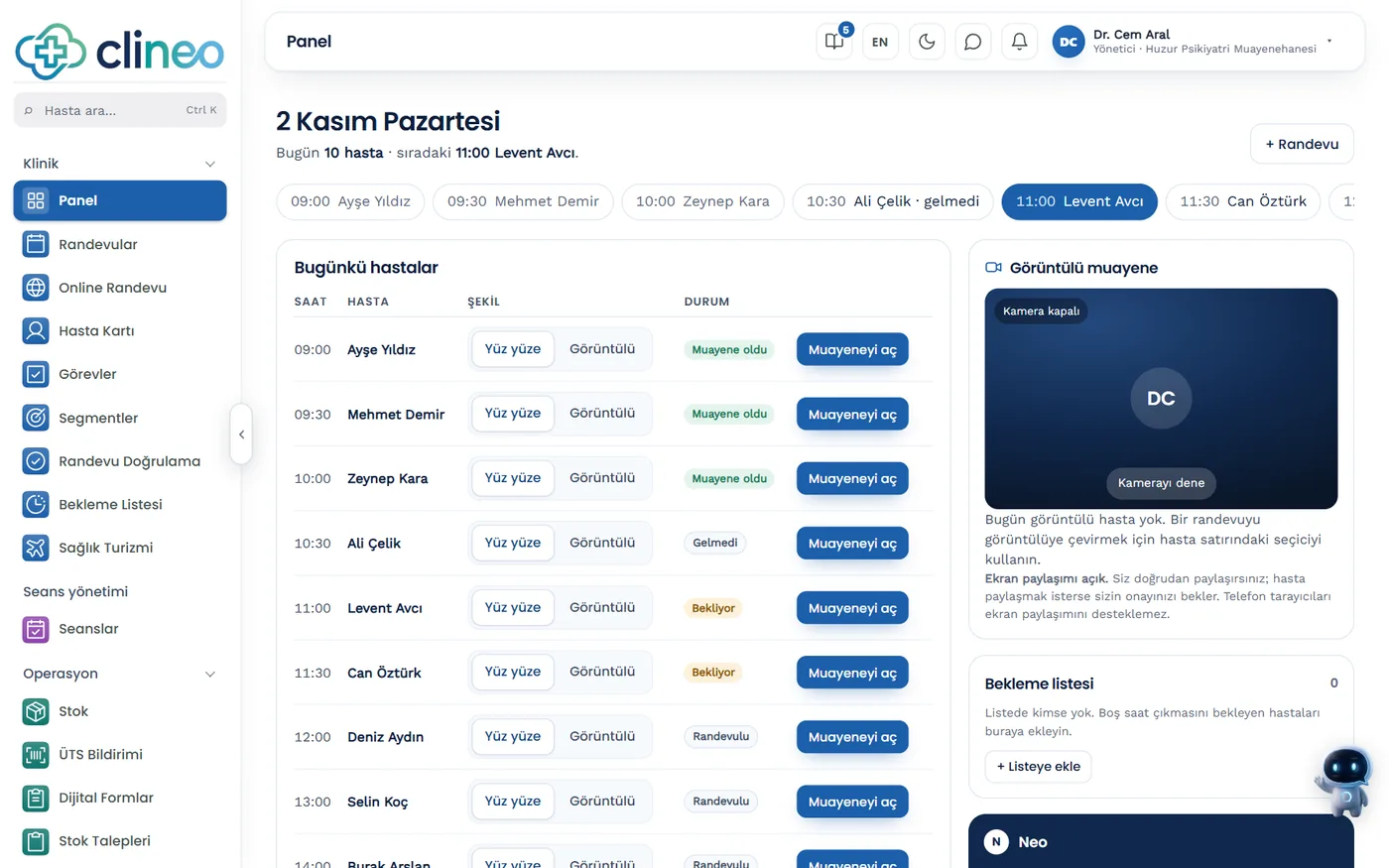
The home screen shows the day’s patient queue and the selected patient’s examination.
Scale scores, medication doses and lab results on a single timeline covering the last 6 months.
The diagnosis is added from the ICD-10 list; the mental status examination, side effects and plan are on the same screen. The prescription is printed from here.
Weight, BMI, waist circumference, blood pressure, ECG/QTc; lab values such as lithium, valproate, blood glucose, lipids and prolactin, with their dates.
If you select the stock item when recording the injection, one unit is deducted from stock. Patients whose next injection is overdue appear on the Follow-up list.
Tests you ordered at the last examination but have not entered results for, in a separate list.
YMRS, HAM-D (17 items), CGI-S and CGI-I are completed during the examination; they are not sent to the patient as a link.
Examination attendance certificate, physician’s status letter, referral/consultation letter. Diagnosis and medication are only included if you tick them; they do not replace an official medical report or e-Rapor (Turkey’s electronic medical report system).
Session management
FAQ
Can’t find your answer? Open the demo and try it yourself. If you get stuck, the user guide is at hand.
Open the demoRead more
We’ve gathered the three most asked topics about choosing clinic software into separate guides.
What to look for when choosing clinic software, and what each module is for.
Practical ways to lower your no-show rate.
A clinic’s responsibilities and practical steps when processing health data.
Let’s look at it for your specialty
Open the demo and try the psychiatry workflow your way. Your account opens right away, free for 14 days.