The list is one piece
A new patient and one who hasn’t come in for two years get the same message.

Features
The 41 features in our plans plus the core modules included in every plan. All of them work on the same patient record.
All featuresSpecialties
Appointments, patient record and finance are the same in every specialty. The examination screen adapts to yours.
All specialtiesClineo Lab
Turn the case sent by a clinic into a work order, follow production on a board and manage each clinic’s account in one place.
Dental lab softwareResources
Articles on regulations, switching systems and day-to-day operations.
All articlesPatient Segments
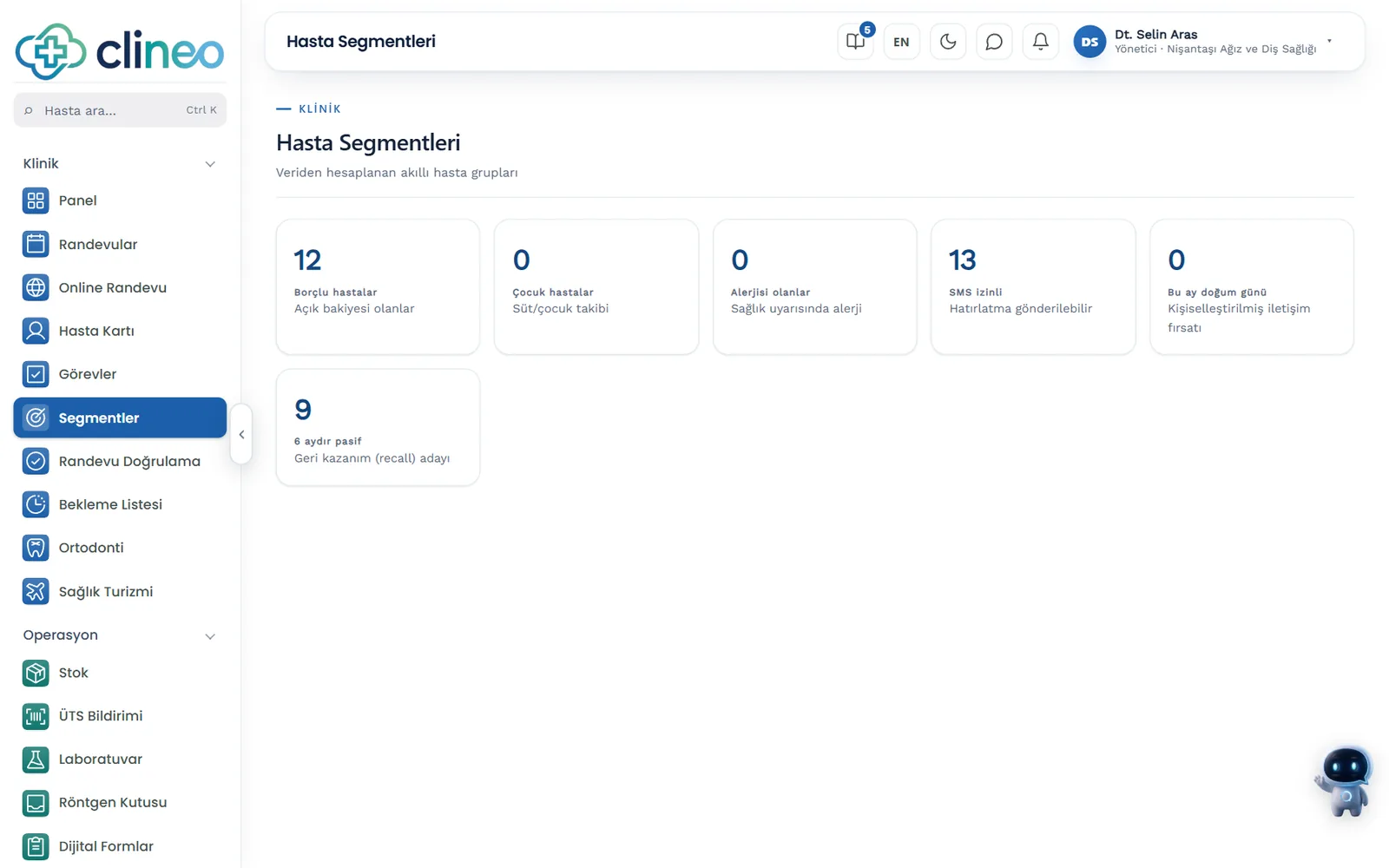
Patients with debts, inactive patients and upcoming birthdays sit in ready-made lists. See who to reach and open the patient from the list.
Not everyone is the same
Six ready-made lists: with debts, children, with allergies, SMS consent, birthday this month and absent for six months. Open a patient from the list and write with the message button on the card.
Familiar problems
If the patient list is one big pile, communication stays generic; a generic message reaches no one.
A new patient and one who hasn’t come in for two years get the same message.
A list filtered in Excel is out of date a week later.
How big each group is isn’t measured.
What changes
You’re looking at the same patients, this time in ready-made lists.
Irrelevant messages cost trust.
Ready-made segments — Patients with debts, children, allergies, SMS consent, birthdays and inactive patients each sit in a separate list.
Stale a week later.
Always up to date — Patients who meet the rule join the group automatically; you don’t bother preparing lists.
It’s unclear who was reached.
Group insight — See how big each group is and plan who to reach accordingly.
Why Clineo
Segment lists open onto the patient card, and you write the message from there.
Six lists calculated from your records.
Open the patient from the list and send your message from the card.
Patients who meet the rule join the group on their own.
See how big each group is.
See the patients to call in one list.
See who has a birthday this month.
How it works
Segment lists open onto the patient card, and you write the message from there.
Click one of the six ready-made lists.
Matching patients are grouped.
Go from the list to the patient card.
Send it by SMS, WhatsApp or email.
Works together with
A segment is the list that shows who to reach.
the “inactive for 6 months” list shows recall candidates
the “SMS consent” list shows who can receive an SMS
find the patient to send content to in the list
see long-absent patients on both screens
satisfied patients are listed separately on the reputation screen
AI assistant
Say "Open patient segments" and Neo opens the screen. Say "List patients with debts" and it writes the list in its reply. You decide who to reach and how to write.
Where to start
Start with one list: patients inactive for six months. Once you’ve seen it, decide what message to reach them with. The list is calculated from your records, so you never have to build it by hand again.
Clinic CRM
It works on top of the patient record, with no separate sales software to set up.
Patients are listed by debt, age, allergies, consent and last visit.
You send an invitation to patients who haven’t come in a long time.
Unfinished treatment plans and patients who have not returned are listed.
You ask satisfied patients for a review.
FAQ
Can’t find your answer? Open the demo and try it yourself. If you get stuck, the user guide is at hand.
Open the demoReady when you are
Open the demo and try Clineo in your own clinic flow. Your account opens right away, free for 14 days.